PCB Blue ⁞ CM9 + AOKP Theme v1.0.4 Requirements: Android 1.5+
Overview: Give your device the look of ultra-crisp circuit boards!

[break]
▒▓ About PCB Blue ▓▒ (Please read fully before rating and/or leaving comments)
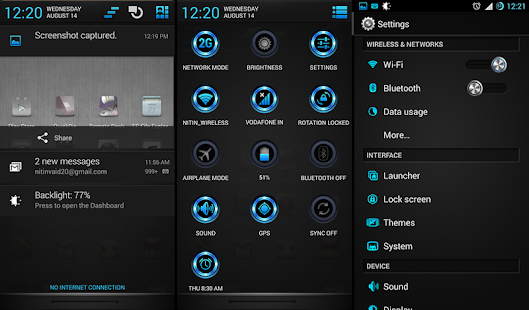
Built for such ROMs as AOKP, CyanogenMOD 9, Gummy, and others which use the T-Mobile Theme Chooser, PCB aims to restyle your device with a very unique look. Ultra-crisp printed circuit board (PCB) patterns adorn the Android UI system elements, while complimenting the original ICS design. MDPI / HDPI / XHDPI images are included, which will ensure this theme looks perfect no matter which device/screen DPI you have.
▒▓ Included Features ▓▒
► Extensive core system theme edits
► Background on Status + Navigation buttons
► Notification pulldown menu + list items styled extensively
► New Status Bar icons (Wi-Fi, BT, Phone, others coloured ICS blue)
► New Circle Battery Icon with improved charging animation (when supported by ROM)
► All Popups/Dialog/Menu boxes styled, and any remaining ICS orange changed to blue
► New icons in Settings and ROM Control (AOKP)
► Phone keypad buttons styled
► Custom PCB keyboard (for default Android input method)
► Contacts slightly modded with blue PCB header
► Android Robot replaces default unknown caller/contact
▒▓ Installation Notes ▓▒
Simply install the theme from Google Play, then navigate to SYSTEM SETTINGS –> THEMES, and apply the DEFAULT SYSTEM THEME first. Next, perform a full REBOOT. After your device starts up again, navigate back to SYSTEM SETTINGS –> THEMES, and apply the PCB THEME you just installed. Due to the recent integration of CM/T-Mobile Theme Engine into ICS ROMs, you may sometimes get an error that pops up when attempting to apply the theme (see first screenshot). Please do not be concerned, as ALL screen sizes are supported with MDPI / HDPI / XHDPI resolutions.
Note that the following ICS elements are not yet able to be styled by the T-Mobile Theme Engine:
- Lockscreen
- Layout XMLs
▒▓ PCB Themes Homepage ▓▒
► http://pcb.team.broc.co/li/apps/pcb-…-theme-chooser
▒▓ Support Notes ▓▒
Please note that we, as developers, cannot leave feedback in the comments. Please click the “Website Link” for this theme, as it will bring you to the homepage where you may leave comments that we can reply to directly. If you are having issues and would like us to help you easier, please use the Comments on the theme’s homepage, RATHER THAN LEAVING POOR RATINGS. A _massive_ amount of work has been put into this theme, and we sincerely do our best to get it to perfection.
What’s in this version:
June 3, 2012
• Added a missing ‘hide recents’ navbar button image for Tablet UI
• Fixed the stretch distortion on new system window background
• Added new background to system wind-ows (Settings, etc.)
• Fixed DeskClock / Alarm text size in Popup
• Fixed glitched notification pulldown background (M/HDPI)
• Fixed notification menu and status bar background on Tablet UI
Provided by: -Market Militia-
More Info:
Code:
https://play.google.com/store/apps/details?id=com.teambroccoli.theme.pcbblue
Download Instructions:
http://extabit.com/file/27b6pdnxlrle6
Mirror:
http://rapidgator.net/file/17869258/p104-MM.apk.html
 APK Free